

Description
Browser-Based Audio Editor for Creative Projects
Overview
The software is a browser-based audio editor designed for users who need a lightweight, accessible tool to manage and modify audio content directly within modern web browsers. Built using JavaScript and the Web Audio API, it operates without plugins such as Flash, making it compatible with Chrome (version 36 and above) and Firefox (version 35 and above). This tool is particularly suited for hobbyists, students, podcast creators, and independent musicians who require basic to intermediate audio editing capabilities without installing heavy desktop software.
It enables users to adjust playback speed, edit multiple tracks, apply volume and pan controls, and use basic audio effects like filters and dynamic compression. The interface supports real-time editing while playback is active, allowing for immediate feedback during adjustments. Projects can be saved locally or stored in Google Drive, with offline functionality available after initial setup in Chrome. However, the developer has issued a clear warning: the application is experimental and may crash under heavy usage, particularly with projects exceeding 45 minutes or consuming over 300MB of memory.
Given its reliance on browser memory limits, the software is best suited for small to mid-sized audio projects. High-stakes or professional-grade work is not recommended due to stability concerns. Despite these limitations, its cross-platform compatibility across Windows, Mac, Linux, Android, and iOS makes it a flexible option for users who value accessibility and minimal setup. The tool’s ability to run entirely in the browser, without requiring installation, is a significant advantage for users seeking quick access to audio editing tools.
Key Features & Capabilities
- Speed Adjustment with Pitch Shift – Users can modify the playback speed of audio sections, though this alters pitch as a side effect. Useful for creating voiceovers or aligning audio to different tempos.
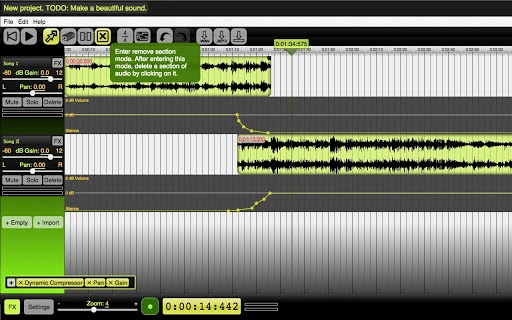
- Multi-Track Editing – Supports editing multiple audio tracks simultaneously. Features include muting, soloing, volume and pan adjustments, and track reordering via drag-and-drop.
- Section Manipulation – Offers tools to move, duplicate, split, and delete audio sections, enabling precise control over project structure.
- Volume Envelopes & Fade Effects – Custom fade-ins and fade-outs can be created using volume envelopes, ideal for smooth transitions between clips.
- Undo/Redo Functionality – Provides a reliable history system to revert recent changes, improving workflow safety.
- Master Volume Control – Centralized control to adjust the overall output level of the project.
- Audio Effects Application – Apply filters, dynamic compression, and other effects to individual tracks or the master output. Effects can be reordered or moved across tracks using drag-and-drop.
- Zoom and Real-Time Editing – Supports zooming for detailed editing and allows modifications while playback is active for instant feedback.
- Recording & Rendering – Users can record audio through their microphone and render the combined output of all tracks into a single new track.
- File Import and Export – Accepts various audio formats for import. Exports projects as 16-bit WAV or 128-bit MP3 files.
- Memory Management – Includes tools to clear unused audio data, helping reduce memory usage and prevent crashes during export or playback.
- Project Storage – Projects can be saved locally or to Google Drive. Offline access is supported in Chrome after the first use.
User Interface, Workflow & Performance
The user interface is designed around a timeline-based layout, typical of digital audio workstations. Navigation is intuitive, with track lanes, waveform visualization, and playback controls positioned for efficient workflow. The drag-and-drop functionality for reordering tracks and effects enhances usability, particularly for users familiar with audio editing software.
Editing while playback is active allows for immediate feedback, which is beneficial during fine-tuning of timing, volume, or effects. The interface supports responsive design, making it usable on both desktop and mobile devices. However, performance is heavily dependent on the browser’s memory allocation, especially in Chrome, which limits the amount of audio data that can be processed simultaneously.
The developer did not specify resource usage details. Performance observations are based on general software behavior patterns. Users working with large projects may experience lag, freezing, or crashes, particularly when exceeding 300MB of memory usage or project duration over 45 minutes. Stability may vary across devices and browser versions. While the tool is functional for lightweight tasks, it is not optimized for professional-grade audio production due to inherent browser constraints.
Compatibility & System Requirements
The software is compatible with Windows, Mac, Linux, Android, and iOS platforms, provided the user has a modern browser such as Chrome (version 36+) or Firefox (version 35+). It does not require installation, as it runs entirely within the browser environment.
The installation size is listed as 200MB, which reflects the application’s bundled assets and runtime dependencies. However, since it is a web-based tool, this size refers to the initial download and caching of the application files, not a traditional desktop install.
Exact system requirements were not listed. The software relies on the Web Audio API, which is supported across modern browsers but may vary in performance depending on device hardware. CPU and RAM behavior are not specified. Users should ensure their device has sufficient memory and processing power to handle audio rendering, especially when working with multiple tracks or complex effects.
Pros and Cons
Pros
- Runs directly in the browser—no installation required.
- Supports multiple platforms: Windows, Mac, Linux, Android, iOS.
- Offers core audio editing features: multi-track editing, effects, undo/redo.
- Allows offline use in Chrome after initial setup.
- Exports to common formats: WAV and MP3.
- Memory management tools help reduce crash risk.
Cons
- Experimental status with potential for crashes under heavy load.
- Performance limited by browser memory constraints.
- Speed changes alter pitch, which may not be desirable.
- Not recommended for high-stakes or large-scale audio projects.
- Unsupported on older browsers or devices without Web Audio API.
Is the software free to use?
Yes, the software is free and does not require a paid subscription or license.
Can I use this tool offline?
Yes, Chrome users can access the editor offline after the first use, provided Google Drive integration is not required. Offline functionality is limited to local project storage.
What operating systems are supported?
The software runs on Windows, Mac, Linux, Android, and iOS through compatible browsers such as Chrome and Firefox.
Are there any security risks?
The application is built using standard web technologies and does not require plugins. It runs in a secure browser sandbox. However, users should only import audio files from trusted sources.
How often are updates released?
Updates are released as new features are developed. The developer encourages user feedback via email for feature requests and improvements.
Final Thoughts
This browser-based audio editor offers a surprisingly capable set of tools for casual and intermediate users who need a lightweight, accessible solution for audio editing. Its cross-platform availability, real-time editing, and offline support in Chrome make it a compelling choice for students, podcasters, and creators on the go. While its experimental nature and memory limitations restrict its use in professional environments, it excels in simplicity and convenience.
For users who prioritize ease of access and do not require high-end features or stability under heavy workloads, this tool delivers strong value. The ability to edit audio directly in the browser without installation is a significant advantage. However, caution is advised when working on large or complex projects due to the risk of crashes.
Download Browser-Based Audio Editor for Creative Projects now to experience a modern, accessible audio tool built for the web.
Guides & Tutorials for Beautiful Audio Editor App for Chrome
How to install Beautiful Audio Editor App for Chrome
- Click the Preview / Download button above.
- Once redirected, accept the terms and click Install.
- Wait for the Beautiful Audio Editor App for Chrome download to finish on your device.
How to use Beautiful Audio Editor App for Chrome
This software is primarily used for its core features described above. Open the app after installation to explore its capabilities.
User Reviews for Beautiful Audio Editor App for Chrome 0
No reviews found





